

Pick the goal event first
The goal event is the reward signal. Every time a user who was exposed to the policy fires the goal event, the allocation they saw gets credit. Good goal events share a few properties:- They happen soon after exposure. The engine re-evaluates on a fixed window (typically hourly). An event that lands days after the decision — a subscription renewal, a delivery confirmation — starves the optimizer of feedback. Prefer a leading indicator (
add_to_cart,signup_started) and measure the lagging outcome with a metric instead. - They’re frequent enough to learn from. An allocation needs a steady stream of rewards to separate from its peers. If the event fires a handful of times a day, an adaptive policy will technically work but converge very slowly — a static A/B test may serve you better.
- They’re attributed to the same unit. The event’s
unitKeymust match the unit that received the exposure (usually the user). Events fired before a user’s first exposure don’t count toward any allocation. - They fire once per action. Double-firing (a
useEffectre-running, a retry loop) silently inflates one allocation’s rewards. Guard the track call so one real-world action produces one event.
The goal type: how events become a score
The goal type tells the engine how to aggregate a user’s goal events into a per-user score:
The goal type changes the statistics under the hood, not just the arithmetic:
- Conversion rate goals use a Bayesian success/failure model — the textbook approach for binary outcomes.
- Count and sum goals switch the engine to a model built for unbounded values: it measures both the average per user and the natural spread of per-user values in your actual traffic. This is why choosing the right goal type matters — it’s not a label, it’s the model. Squeezing counts through the binary success/failure model would make the leader’s “probability of being best” collapse toward its share of traffic, which tells you nothing. With the right model, the spread is measured rather than assumed: if your users’ values vary wildly (a few whales among many small orders), the engine shifts traffic more cautiously; if they’re consistent, it converges faster.
No events? Pick a goal metric
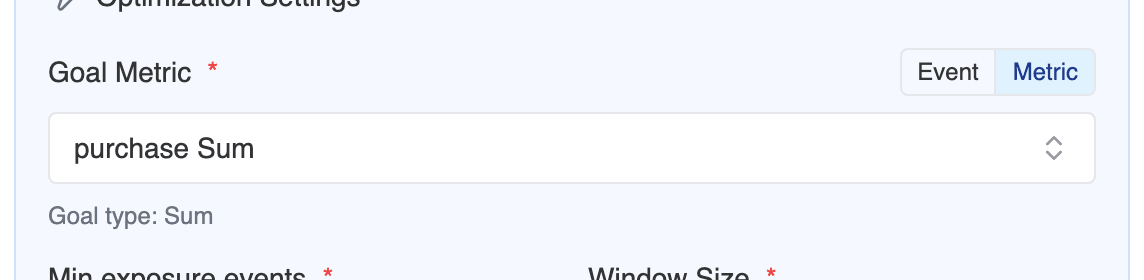
The goal event is a convenience: what the optimizer actually reads is the policy’s primary metric, which the goal event resolves to at creation (the dialog shows it — “Optimizing metric: purchase Count”). On warehouse-only projects with no event definitions, the goal step is a metric picker instead: choose any fact-backed conversion, count, or sum metric and the goal type follows the metric. Projects with events get the same option — the goal step has a toggle to switch from the event dropdown to the metric picker, so you can optimize a warehouse metric directly even when native events exist. See Optimizing with your warehouse for the full recipe. A goal metric whose desired direction is decrease (an error rate, a latency, a cancellation count) makes the optimizer minimize — traffic shifts toward the allocation with the lowest per-user score. Ratio metrics can’t be goals: their reward would use only the numerator. The goal can also be a composite metric — a weighted sum like revenue minus cost — so the optimizer trades several outcomes off against each other directly instead of chasing one event.Pick the algorithm
Start with Thompson Sampling. Deviate only when you have a specific reason:
Two quick sanity checks before choosing anything other than Thompson Sampling:
- Personalization or optimization? If you expect one allocation to be best for everyone, you don’t need a contextual bandit — the simpler algorithms converge faster on a single winner.
- Do you actually need determinism? UCB1’s appeal is being non-random, but Thompson Sampling’s randomness is exactly what makes it robust to noisy early data.
Creating the policy in the dashboard
In Layers, create a policy and set the Policy Type to Adaptive (“AI-optimized allocation. The algorithm adjusts splits based on reward signals.”). The adaptive configuration section then asks for:- Algorithm — the four options above, Thompson Sampling preselected.
- Goal Event — a dropdown of your defined events. This is the reward signal; everything in Pick the goal event first applies here. A toggle switches the step to a Goal Metric picker instead (see No events? Pick a goal metric); on projects without events the metric picker is all you see.
- Goal Type — how the goal event aggregates per user (see The goal type). Preselected from the event’s value type; override it if the suggestion doesn’t match your intent.
- Min exposure events (default 100) — the engine won’t move traffic until the policy has this many exposure events. Raise it for noisy goals; lowering it below ~100 mostly buys you noise.
- Window Size (default 1 hour) — how often the engine re-evaluates. Shorter windows react faster but on less data per step. Hourly is right for most traffic levels.
What to expect while it runs
The optimizer is deliberately careful with your traffic:- It ramps, it doesn’t jump. Even when one allocation looks like a clear winner, traffic moves by a capped step per window (20% by default) and every allocation keeps a small exploration floor. A decisive winner typically goes from an even split to ~95% over a few windows, not instantly.
- Phases tell you where it is. The policy page shows exploring → learning → converging → converged as the leader’s win probability grows.
- Converged is not the same as proven. “Converged” means the optimizer is confident enough to concentrate traffic. If you attached a primary metric, the measured verdict (an anytime-valid confidence interval when sequential testing is enabled) is the standard of evidence for promoting the winner — and it’s deliberately stricter. A policy can be converged while the measured lift is still inconclusive; the dashboard will tell you to keep it running before completing.
- Contextual policies don’t get a runtime estimate. There’s no single winner to forecast — winners vary per context — so measurement progress tracks evidence on the primary metric without a time-to-winner estimate. The other algorithms do get one.
- Bandits trade measurement speed for regret. As traffic concentrates on the leader, the other allocations accrue data more slowly, so statistical significance arrives later than it would in a fixed 50/50 test. If you need a clean, fast, stakeholder-ready verdict, run an A/B test; if you want to stop paying the cost of the losing allocation as soon as possible, use an adaptive policy.
Next steps
Optimization
Setup walkthrough, tuning knobs, per-entity and contextual bandits.
Statistics
How measured significance works — and why it gates promotion.