

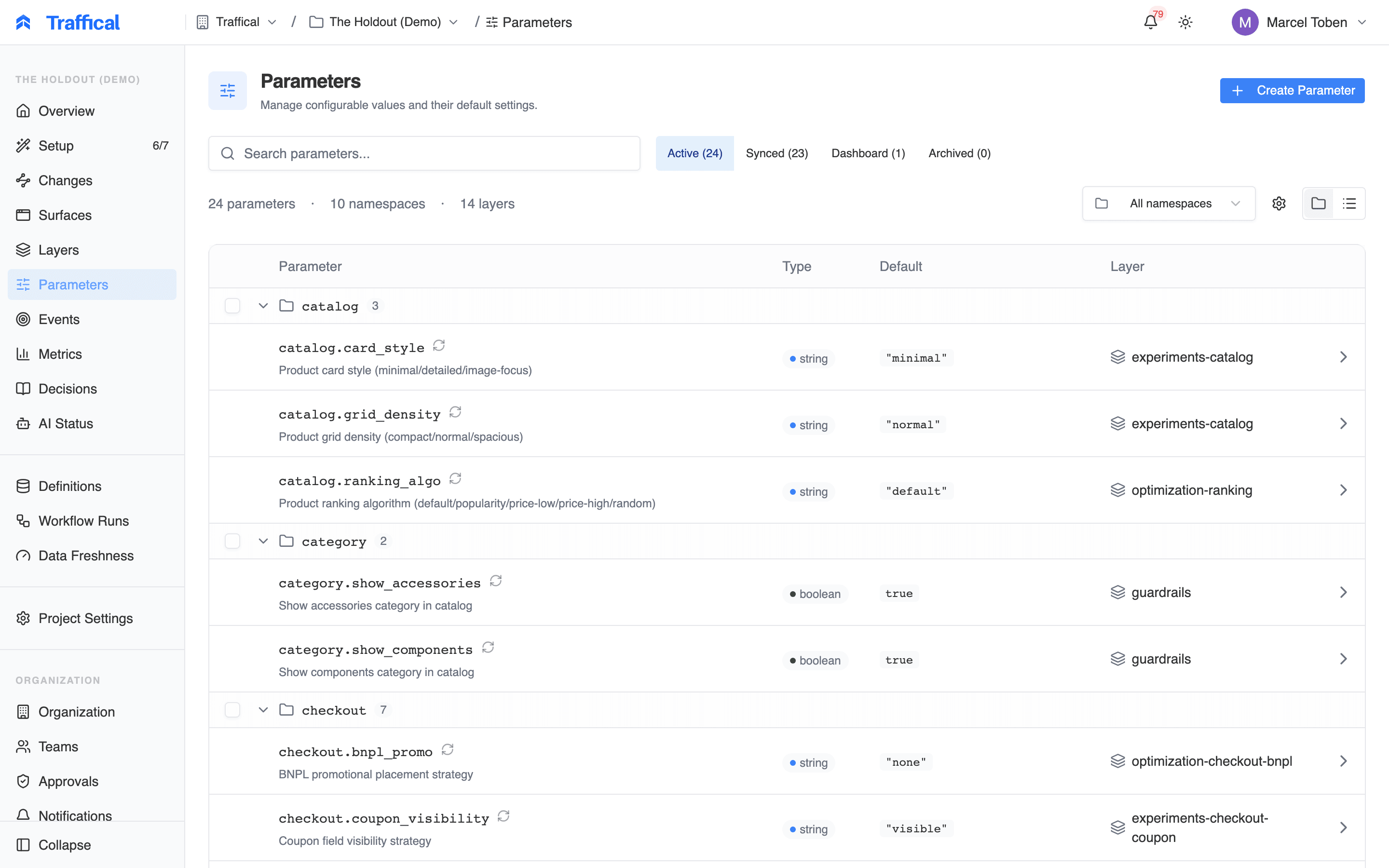
Parameters list
The list
Each row shows:- Parameter — the key (
checkout.button.color), with its description underneath - Type —
string,number,boolean, orjson - Default — the current base default value
- Layer — the layer the parameter belongs to
- A sync icon — the definition is managed in
.traffical/config.yamland pushed via the CLI; its tooltip shows the source file and when it was last synced. See synced parameters. - An Orphaned badge — a synced parameter that was removed from the config file. Re-add it to the config, or archive it with
traffical push --prune.
Filtering and views
The filter tabs split the list into Active, Synced, Dashboard (created in the UI), and Archived, each with a count. Search matches keys, descriptions, namespace names, and layer names; the namespace dropdown narrows the list to a single namespace. There are two view modes:- Grouped — parameters under collapsible namespace headers (the default)
- Flat — one table, sortable by namespace, key, type, or layer
Managing namespaces
The gear icon next to the namespace filter opens the namespace manager. From there you can create a namespace, edit its description, and assign an owning team. A namespace can only be deleted when it’s empty, and themain namespace can’t be deleted.
Creating a parameter
Click Create Parameter. Creating and editing parameters requires the parameter write permission — see roles and permissions. The editor opens as a two-pane dialog: a form on the left, a preview on the right.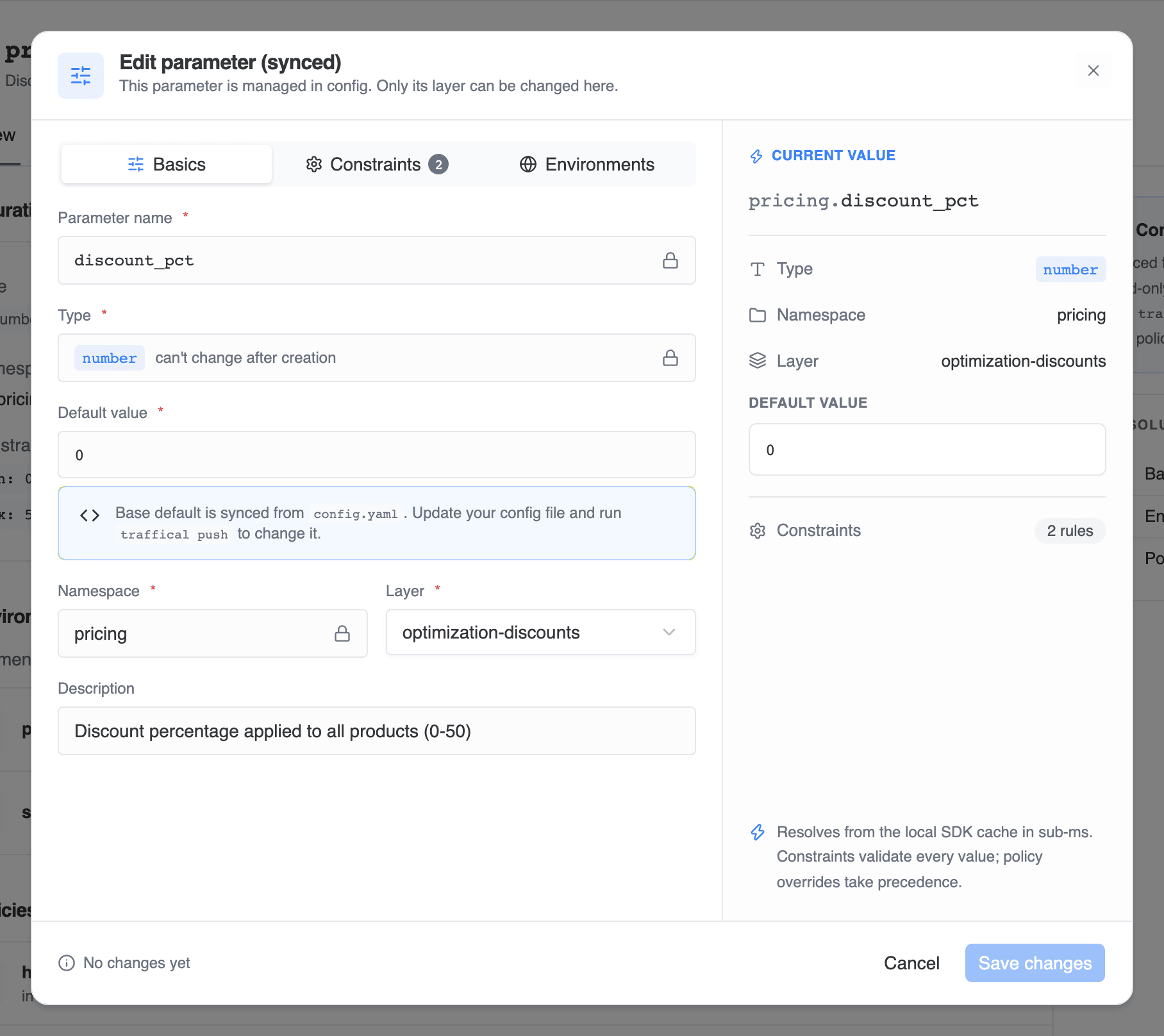
Parameter editor
Basics
- Parameter name — the local name. If the namespace isn’t
main, the namespace prefix is shown in front of the input and the helper text shows the full key your code resolves (checkout.buttonColor). Keys start with a letter and can contain letters, numbers, dots, underscores, and dashes. - Type —
string,number,boolean, orjson. The type is locked after creation. - Default value — required. When the constraints include allowed values, the free-text input becomes a dropdown.
- Namespace — pick an existing namespace or choose Create namespace… inline.
- Layer — required; every parameter belongs to exactly one layer. See layers and policies.
- Description — optional, up to 500 characters.
Constraints
Constraints validate values before they reach the SDK. They apply tostring and number parameters, and they check both the default value and every environment override — a violating value blocks saving.
- Range (
number) — a minimum, a maximum, or both. - Regex pattern (
string) — values must match. The Templates button opens a searchable list of common patterns (hex color, email, HTTPS URL, semver, and more) so you don’t have to write the regex yourself. - Allowed values (both) — restrict the parameter to an explicit set. Adding any switches the value fields from free text to a dropdown.
Environments
Toggle an environment on and enter a value to override the default there — a lowertimeout in staging, a test key in development. Overrides sit between the base default and policy overrides: a running policy still wins at resolve time.
The preview pane
On create, the right pane is a live preview that updates as you type: the full resolved key, type, namespace, layer, the default value, and counters for constraint rules and environment overrides. When you edit an existing parameter the pane is headed Current value, but it still reflects the form as you change it — only the header differs from create. The pane also reminds you how resolution behaves: values resolve from the SDK’s local cache in sub-milliseconds (no network call per lookup), constraints validate every value, and policy overrides take precedence.Editing a parameter
The pencil icon on the detail page opens the same dialog in edit mode. Two differences from create:- The type is locked — it can’t change after creation.
- The footer shows No changes yet until you actually change something, and the save button stays disabled.
buttonColor → checkout.buttonColor), and the editor warns you: that’s a breaking change for any code resolving the old key.
Synced parameters
Parameters whose definitions live in.traffical/config.yaml are marked Synced, and the dashboard treats the config file as the source of truth. Opening one in the editor shows Edit parameter (synced): the name, type, default value, namespace, description, constraints, and environment overrides are all read-only — the name, type, and namespace carry a lock, and the default value points at the config file it’s synced from. Only the layer can be changed from the dashboard.
To change anything else, edit the config file and run traffical push — the editor shows exactly which file the parameter is synced from.
To move a dashboard-only parameter into code, run traffical import param <key> to write the definition into your config file, then traffical push to mark it as synced.
Parameter detail
Clicking a parameter opens its detail page, with Overview and History tabs.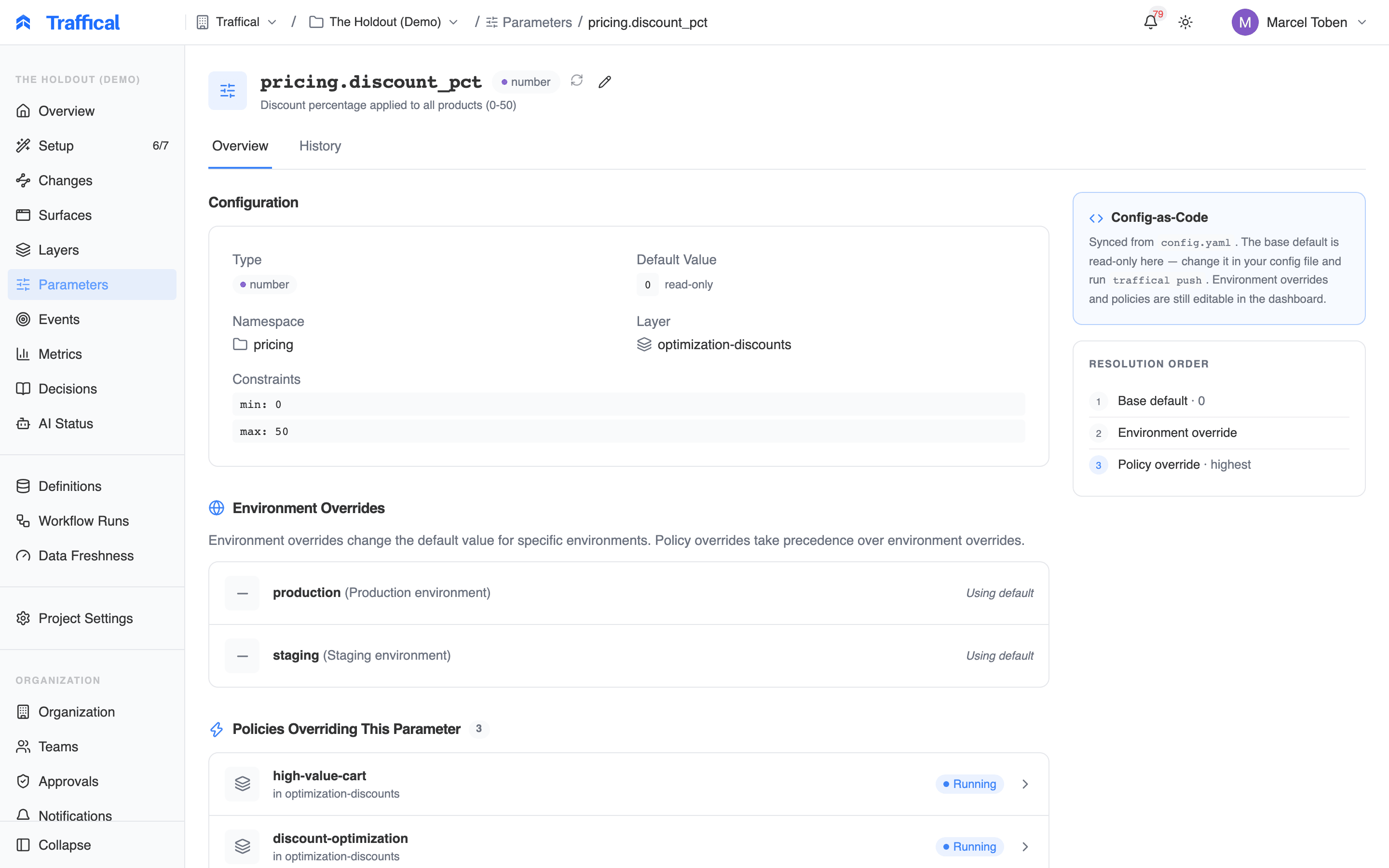
Parameter detail
- Configuration — type, default value, namespace, layer, and constraints. For synced parameters, the default is labeled read-only.
- Environment overrides — every environment, with its override value or “Using default”.
- Policies overriding this parameter — each policy with its current state, linked to its detail page. This is where you see what’s actively changing the value in production.
- Surfaces using this parameter — the surfaces this parameter is bound to, with a role badge per binding: read, write, render, decision, or side effect. Bindings describe how a surface uses the value, which feeds risk classification and measurement context for changes.
- DOM binding — if the parameter was bound to a page element with the visual editor, the CSS selector, property, and URL pattern it’s bound to.
Bulk actions
Select parameters with the row checkboxes and a floating action bar appears. You can:- Move to Layer
- Change Namespace (renames the keys)
- Archive — or unarchive, when you’re in the Archived view
Archiving
Archiving hides a parameter from the active list without deleting it. Switch the filter to Archived to see archived parameters and restore them at any time. For synced parameters, archiving happens from code: remove the parameter from your config file and runtraffical push --prune.
Next steps
Parameters concept
Types, defaults, namespaces, constraints.
Layers & policies
Where you configure policies on top of parameters.
Surfaces
Binding parameters to the surfaces that consume them.
CLI
Manage parameter definitions as code.