

Organization roles
Every member of your organization has exactly one role:
Under the hood, every action maps to a permission in
resource:action form (metrics:read, policies:write, …), and a role is a fixed bundle of those permissions. You don’t manage individual permissions — you assign roles, and optionally narrow write access further with teams. Roles are managed by organization admins and owners; ask one to change yours.
The operate tier
A small set of permissions is deliberately held back from members and granted only to admins and owners:
Anyone who can operate a change can also propose one —
changes:propose is always bundled with changes:operate.
This is the line between building and shipping. A member can design a test end to end — parameters, allocations, goal metrics, a draft change — but formally proposing it for sign-off or moving real traffic takes an admin, an owner, or an API key that explicitly carries mgmt:operate. Where a transition needs sign-off beyond a role check, approvals layer on top.
The Changes surface is enabled per organization. If you don’t see Changes in the sidebar, it isn’t enabled for your organization yet — the rest of this page applies unchanged.
Teams
Teams let you go one step finer than org-wide roles: a team can own parameter groups, and once a group is owned, only that team writes to it. Create teams on your organization’s Teams page (in the sidebar’s Organization section). A team has a name, an optional description, and a URL-safe key generated from the name that can’t change later. Creating, editing, and deleting teams — and managing who’s on them — is an admin/owner action; everyone can view teams and their membership.
The Teams page
Owning parameter groups
On a project’s Parameters page, an admin can assign an owning team to a parameter group. Ownership changes who can write:- Reads stay org-wide. Anyone whose role can read parameters still sees everything.
- Edits and deletions of parameters in an owned group — and of the group itself — require being on the owning team as owner, approver, or member. Team viewers stay read-only.
- Unowned groups behave as before — writable by anyone whose organization role allows it.
- Org admins and owners can still write to any group. That override is recorded in the activity log, so break-glass access is never silent.
API key types and permissions
API keys are managed on your organization’s API Keys page (in the sidebar when viewing your organization, or from the account menu). Viewing and managing keys is an admin/owner action. A key’s type is its prefix, and it decides which surface the key can reach:
Management and admin keys additionally carry permission slugs — the same vocabulary as the roles above. The create dialog offers a preset per type, and you can narrow it further.
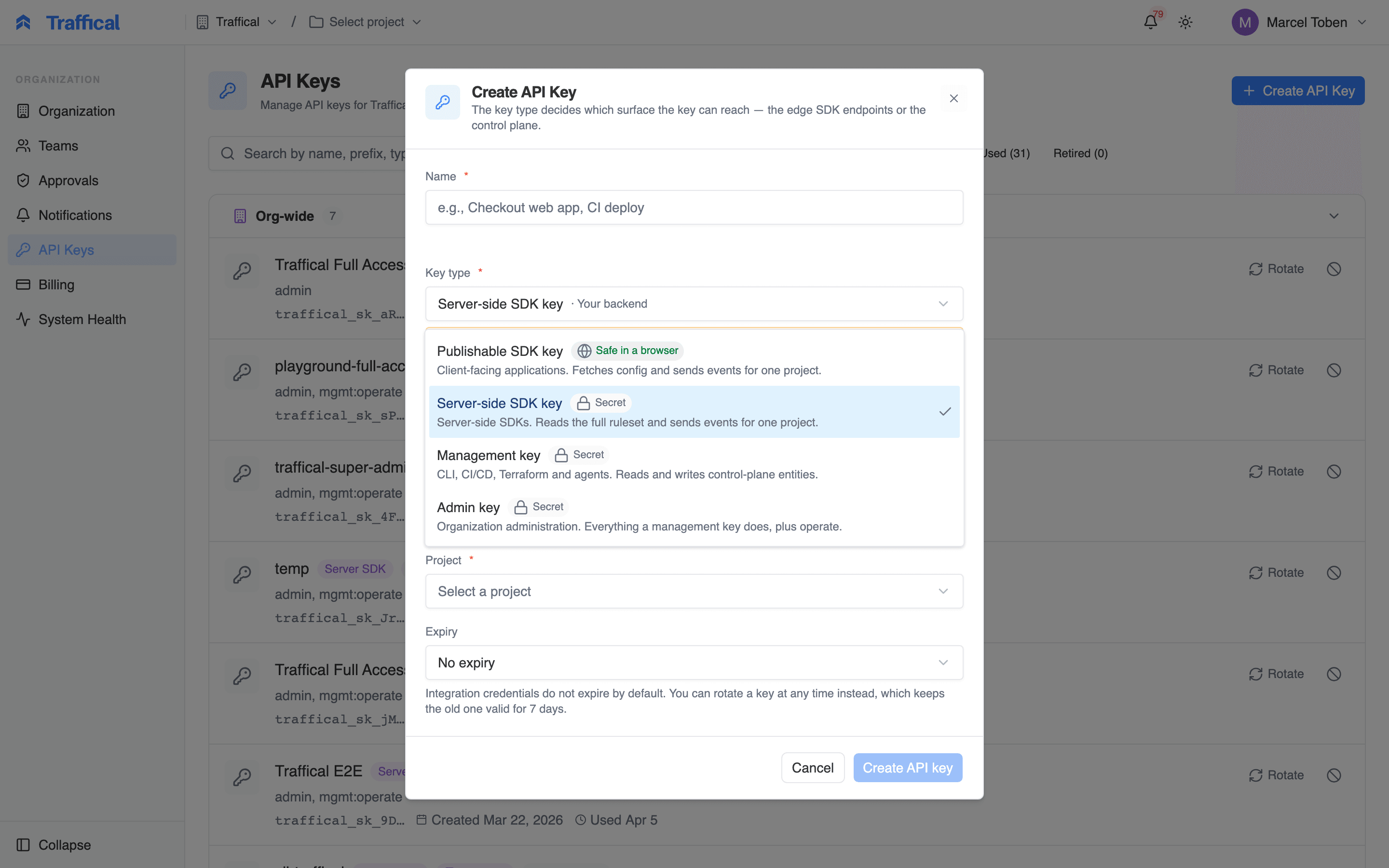
The Create API Key dialog
- SDK keys carry no management access. Publishable and server-side SDK keys serve decisions and receive events but cannot read or change any configuration — they never reach the control plane at all. See API key types.
- A key can never exceed its creator. Permissions are intersected with those of the person who created the key, evaluated on every request — so demoting someone narrows the keys they made, with no cleanup step.
- The management preset mirrors the member role. An automation holding it can build — create metrics, edit policies, push config — but can’t start traffic. Operate permissions are granted deliberately, to automations you trust to execute transitions.
How permissions surface in the dashboard
The dashboard reads your permissions and adjusts itself: sidebar sections you can’t read are hidden, actions you can’t take — New Team, Create API Key — don’t render at all, and transition buttons render disabled with a hint naming the missing permission. A viewer sees the whole product with nothing to press. That filtering is UX, not enforcement. Every request is re-checked server-side, so a hand-crafted request without the right permission fails with a403 no matter what the UI showed. The same is true of team ownership: the write check on an owned parameter group happens on the server, per request.
MCP connections
Connections to the MCP server follow the same model. Sign in with OAuth and the agent acts as you — your role’s permissions apply. Connect with an API key and the key’s scopes apply. Either way the tool list is filtered to what the token can actually do: a read-only connection sees read tools only, and proposing or executing transitions requires the operate tier —mgmt:operate on a key, or an admin or owner signed in via OAuth.
Next steps
Approvals & autonomy
What needs sign-off beyond a role check, and who gives it.
Measurement protocols
The measurement rules changes are held to.
API overview
Key types, endpoints, and error shapes.
MCP server
Connect agents with least-privilege scopes.