

The hierarchy
The URL structure mirrors the hierarchy: organization → project → resource.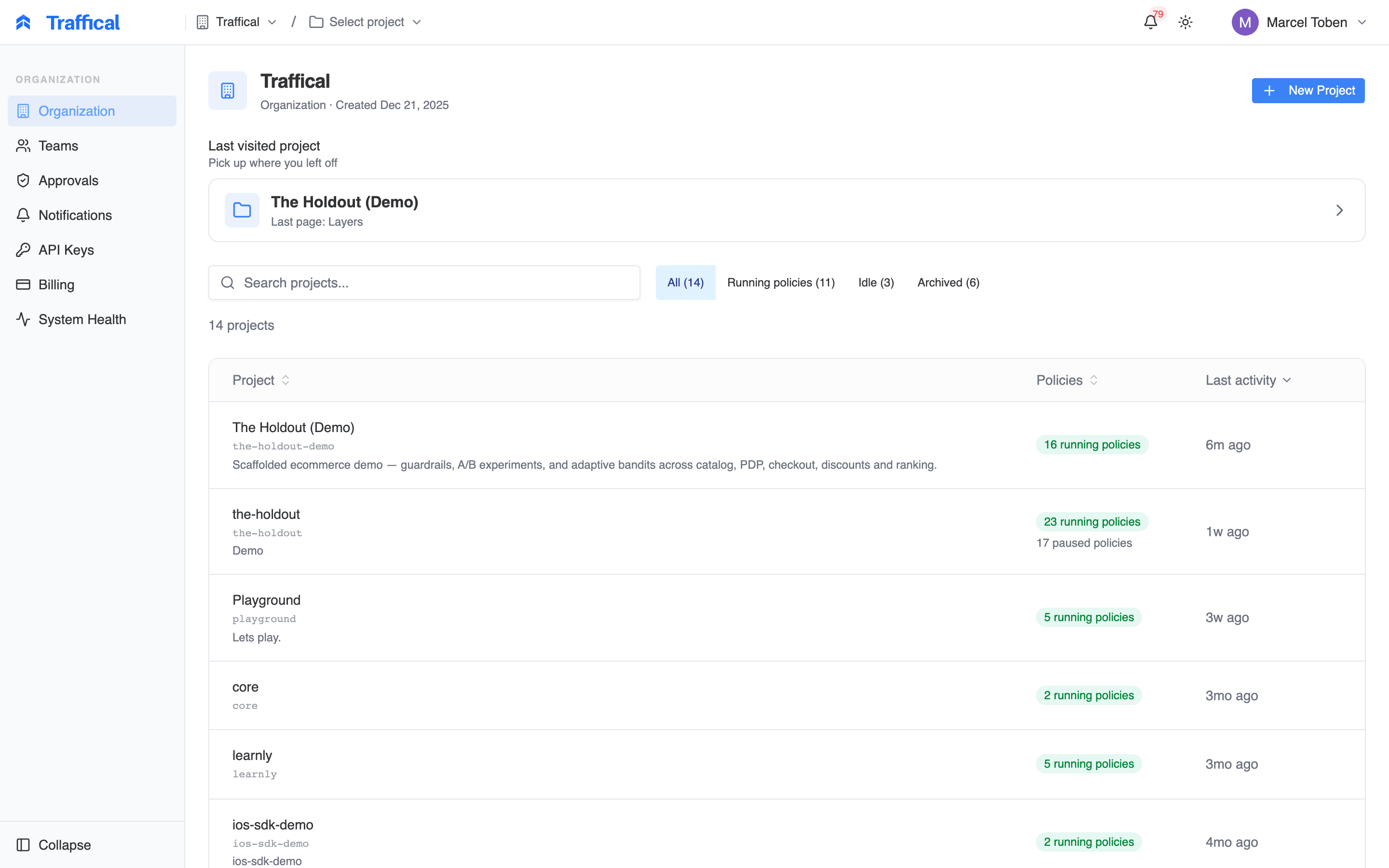
Dashboard home — pick an organization
What’s where
Some sidebar items appear only when you hold the matching permission or when the feature is enabled for your organization — if you don’t see Changes or Billing, that’s why.Project
Overview
The project’s landing page — KPIs, aggregated impact, traffic, recent activity. Toured below.
Setup
Step-by-step wizard for wiring up a new project — warehouse, SDK, first parameters — with progress tracked in the sidebar.
Changes
Governed change lifecycle — wizard, approvals, transitions. Enabled per organization; if you don’t see Changes in the sidebar it isn’t enabled for you yet.
Surfaces
The product contexts changes land in — where risk is classified and measurement protocols attach.
Layers
Traffic containers and the policies inside them. The bulk of day-to-day experimentation work.
Parameters
All parameters in the project — synced (from CLI) and dashboard-only.
Events
Event definitions, property schemas, the event explorer.
Metrics
Metric definitions and their results.
Decisions
The decision log — the audit trail of every policy lifecycle change.
AI Status
Every adaptive policy, grouped by convergence state. Toured below.
Pipeline
Definitions
Entities, assignments, facts — for warehouse-native metrics.
Workflow Runs
Every pipeline run — status, timing, per-run detail.
Data Freshness
How current the computed warehouse data is, per definition.
Settings
The settings group holds project settings: warehouse connection, SDK sync, hashing config, pipeline scheduling, maintenance.Organization
Teams
Members, roles, and team ownership of parameter groups.
Notifications
Choose which alerts you get and where they’re delivered.
API keys
Create, rotate and revoke keys — publishable, server-side SDK, management and admin — org-wide or scoped to a project.
Billing
Plan, usage, invoices.
The project overview
The project’s landing page answers “how is this project doing right now”:- KPI cards — active layers broken down by policy state, plus assignment events, unique units, and reward rate over the last 24 hours, each with a trend sparkline.
- Impact — what your concluded changes are worth (below).
- Traffic Overview — decision, exposure, and track events plus rewards per day, alongside a view of layer bucket allocation.
- Recent activity — the latest project events, so you catch what teammates (and the optimizer) did.
Impact
The Impact section aggregates concluded changes and standalone policies into one program-level answer: what has shipped, and what is it worth per day?
Project overview — the Impact section
- Program strip — shipped winners (with inconclusive conclusions counted alongside as learning), win rate, reverted changes (counted as avoided harm, never as impact), and velocity versus the previous window of the same length.
- Per-metric table — one row per affected metric: daily impact with a confidence interval, the window total (a change shipped mid-window accrues only for its live days), footprint, and a cumulative-impact sparkline. Expand a row to see each contributing change.
- Filters — narrow to a single surface, restrict to results where the metric was the change’s primary metric, and pick any window with the date-range picker (default: the last 90 days).
- In flight (unshipped) — current readings of still-running changes, shown separately and never summed into the totals. A live lift isn’t a realized win until the change ships.
- Optimization (adaptive policies) — the estimated value of adaptive traffic optimization, versus a uniform split (and versus control where that comparison is causal). Also display-only, never summed into the totals.
The AI optimization page
The AI Status entry in the sidebar opens the AI Optimization page: every adaptive policy in the project on one screen, grouped by where it is in its learning lifecycle.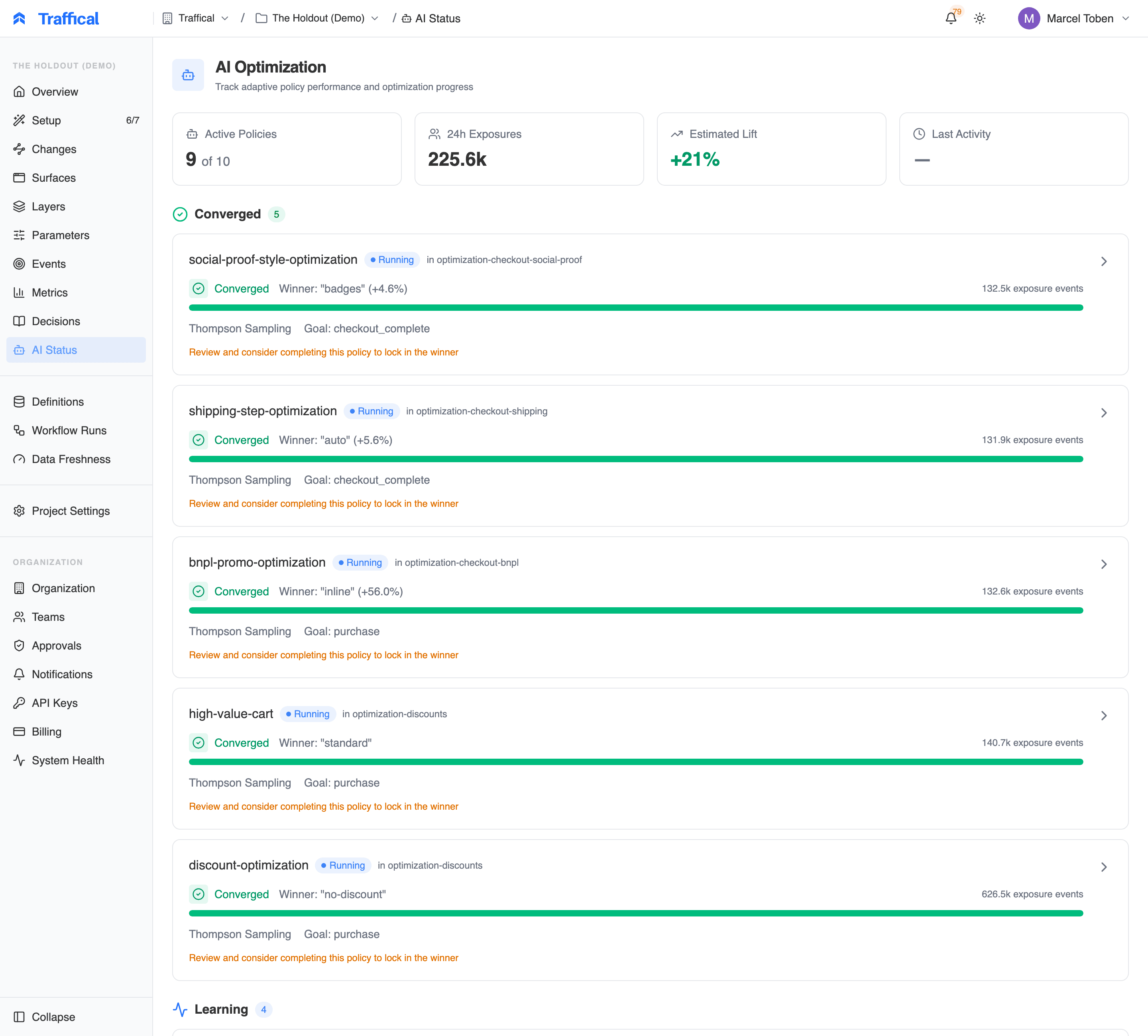
AI Optimization — adaptive policies by convergence state
- Converged — the optimizer has settled: one allocation now carries most of the traffic. These prompt you to review the result and complete the policy to lock in the winner.
- Learning — still exploring: each card shows the live allocation split, the algorithm (Thompson Sampling, Epsilon Greedy, UCB1), the goal it optimizes, and exposure events so far.
Day-to-day flow
Most teams work like this:- Author parameters in code via
.traffical/config.yamlandtraffical push. - Create policies in the dashboard — that’s where A/B tests and rollouts are configured.
- Watch metrics while the policy runs — visit the policy detail page.
- Promote the winner — update the parameter default and mark the policy complete.
Roles
Every member of your organization holds one role — Viewer, Member, Admin, or Owner. Viewers read everything, members do the day-to-day building, and a small operate tier — starting live traffic, executing change transitions, promoting defaults — is reserved for admins and owners. Teams can narrow write access further by owning parameter groups. The full model, including API key scopes, is in Roles, teams & API key scopes.Audit trail
Every change in the dashboard is captured in the decision log — policy state transitions, allocation overrides, rollout actions, manual completions, optimization milestones. Use it to answer “who turned this on / who paused it / who promoted that allocation”.Next steps
Your first A/B test
The end-to-end flow from
traffical init to reading results.Parameters
Walkthrough of the parameters page.
Layers & policies
Where policies live.
Settings → Warehouse
Connect Postgres, BigQuery, Snowflake, Databricks, or ClickHouse.