

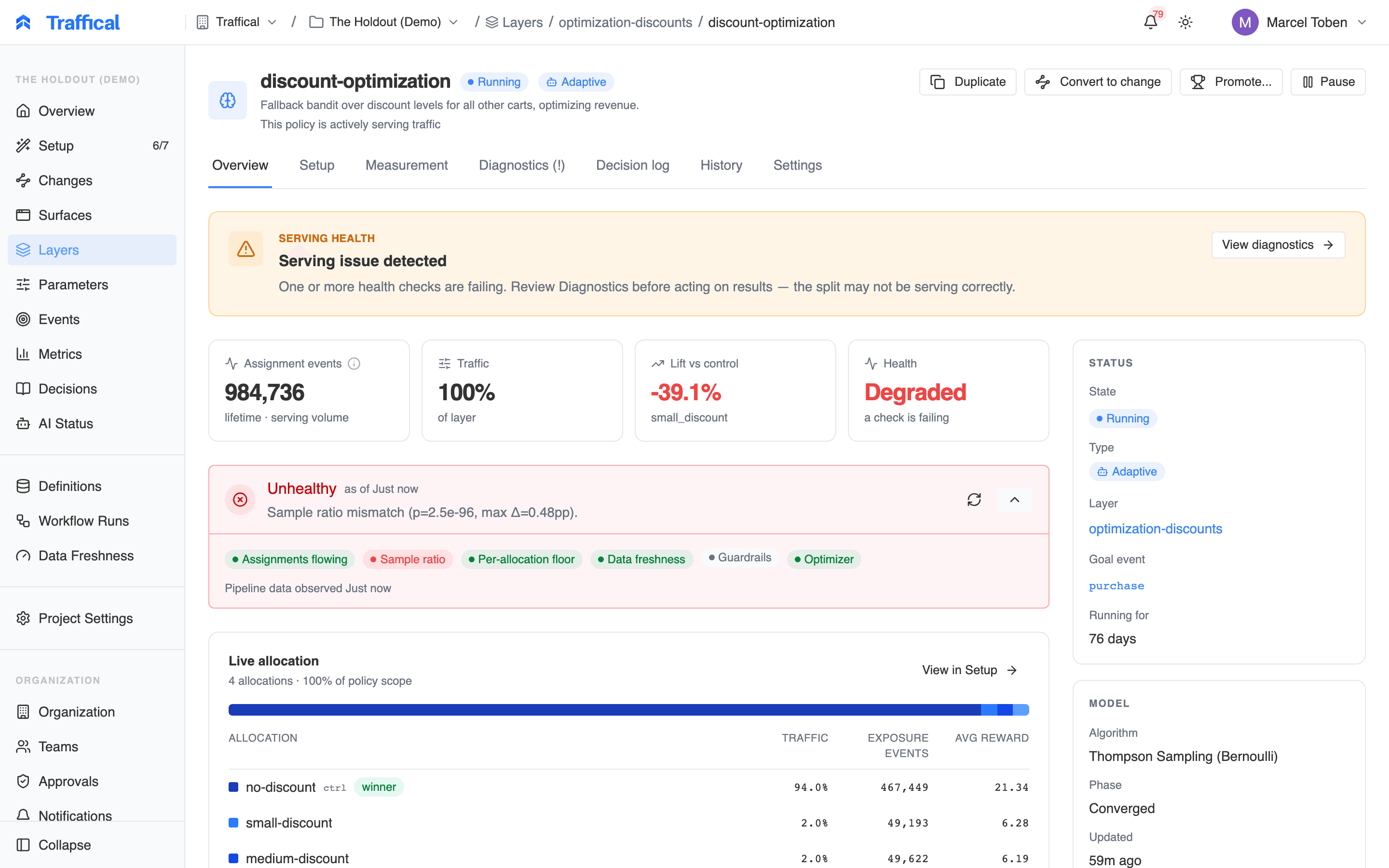
Policy health hero
Where you see it
Open any policy detail page:- The Overview tab shows a compact health hero that auto-collapses when everything is green. Click any pill to see per-check detail. The tab’s Live allocation digest also shows traffic share and assignment events per allocation, so an allocation that stopped receiving traffic stands out at a glance.
- The Diagnostics tab (between Measurement and Decision log) shows
the full assignments time-series, optional SRM history chart, and the
transition log. Its tab label carries a
(!)while any check is warning or failing.
draft state — the readiness checklist covers that
phase.
The six checks (v1)
Adaptive SRM semantics
For adaptive policies, the SRM baseline is the current optimizer weighting (the latestallocationHistory entry). The check re-baselines on every
rebalance — a rebalance that legitimately changes the split will not trip the
check on its own. The side sheet shows which baseline was used for the
current evaluation.
Transition events
Every rollup compares the new health JSON against the previous JSON. Any check whose status changed (including pass → warn) writes aPolicyHealthEvent row.
These power the per-check Transitions list in the side sheet and the
timeline at the bottom of the Diagnostics tab. The same transitions feed
Notifications — a check that starts failing or
recovers lands in the Policy category, deliverable in-app, by email, or
to a shared Slack channel.
Endpoints
The dashboard reads three endpoints; the same endpoints are available via the API:GET /v1/policies/:policyId/health— derived report (six checks + overall)GET /v1/policies/:policyId/health/timeseries?window=24h|7d|30d|lifetime— per-allocation series + SRM snapshot for the chartGET /v1/policies/:policyId/health/events?since=...&limit=...— transition history
pending / empty payloads when the pipeline hasn’t run
yet, so the UI never errors during a policy’s first few minutes.
How it’s computed
- The warehouse-native pipeline emits a
PolicyHealthJsonper running policy as the last phase of every run (policy-health-rollup). The rollup runs three queries against_p_{policyId}_assignments(hourly 24 h, daily 30 d, lifetime) and computes chi-squared in process. - Traffical persists the report and compares it to the previous run’s
report to detect transitions, recording each status change as a
PolicyHealthEventin the same step. - On request, the stored report and transition history feed a pure function that maps the raw data into the six checks + an overall rollup. Identical inputs produce identical outputs, so the same report always renders the same way.