

projects:write — the Warehouse tab checks warehouse:write, and creating entities checks definitions:write. See Roles and permissions.
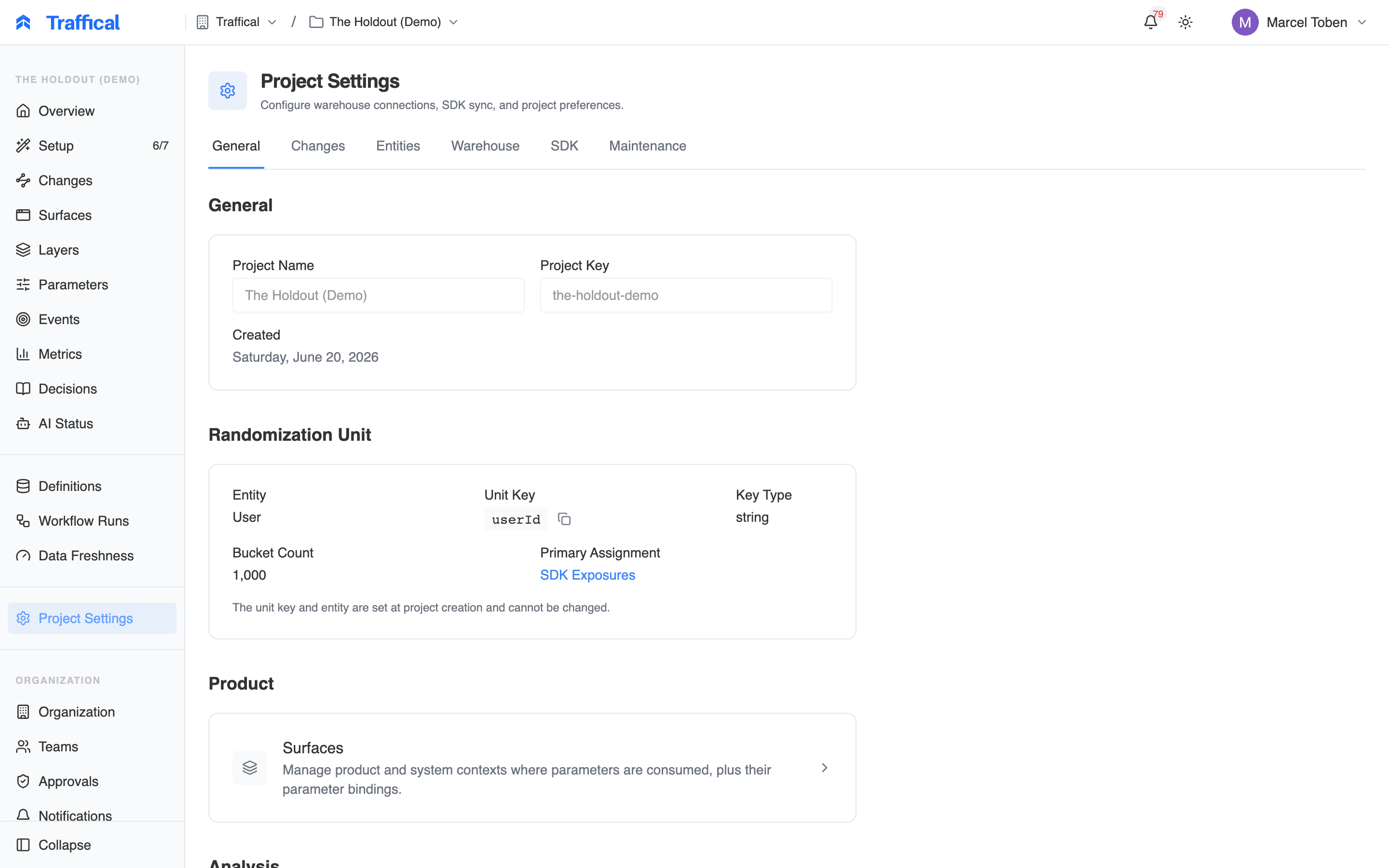
Project settings, General tab
API keys are managed at the organization level, not in project settings — see Projects & environments. Notification preferences also have their own page: Notifications.
Project basics
The General tab opens with read-only facts: project name, key, and creation date, followed by the randomization unit — the primary entity, its unit key (the context field the SDK hashes on, e.g.userId), key type, bucket count, and the primary assignment definition. The unit key and entity are set at project creation and can’t be changed afterwards.
A Surfaces card links to surface management — the product and system contexts where parameters are consumed. See Surfaces.
Change defaults
The Changes card sets project-wide guardrails that the New Change wizard reads every time someone drafts a change.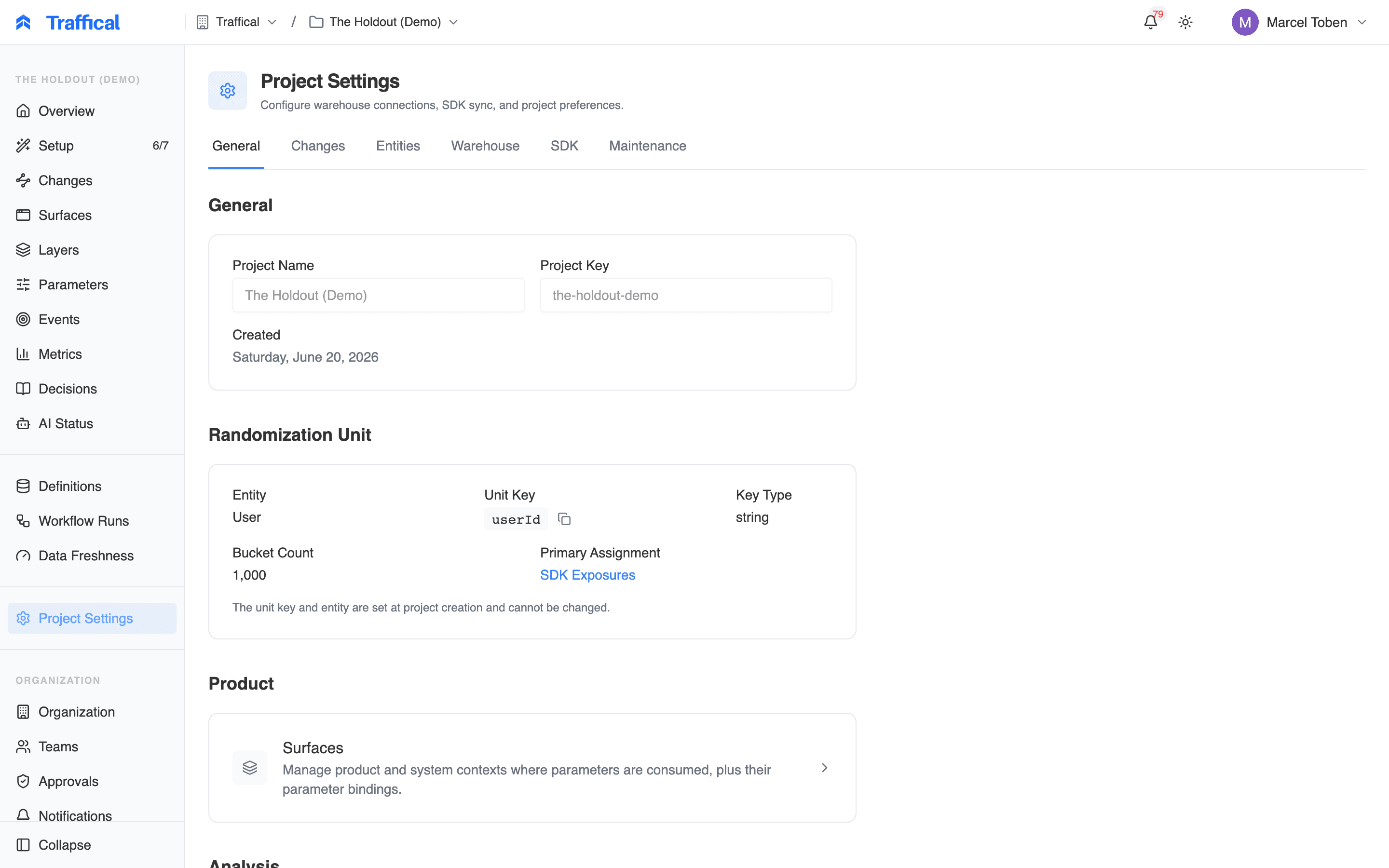
Change defaults card
These are guardrails, not mandates: operators can drag the sliders to override the recommendation per change, within the bounds you set here. The card refuses to save a min above its max.
Analysis defaults
The Analysis card sets project-wide statistics defaults. Each policy inherits them unless it overrides the setting explicitly — the effective rule is always policy setting if set, otherwise the project default.- CUPED variance reduction — use data from before each unit’s first assignment to shrink confidence intervals and reach significance sooner, without biasing results. Off by default. See Variance reduction (CUPED).
- Sequential testing — anytime-valid results: peek as often as you like and the false-positive rate still holds, in exchange for slightly wider intervals. Off by default. See Sequential testing.
- Default target MDE (%) — the minimum detectable effect that measurement progress tracks against when nothing more specific sets one. The precedence is: the measurement protocol, then the policy’s metric attachment, then the metric definition, then this project default. Leave it empty to fall back to the 5% system default.
Serving mode
The Serving card declares who actuates traffic for this project. Leave it on Traffical SDK whenever the SDK serves configuration — including bring-your-own-warehouse setups where assignment data flows through your own pipeline. Switch to External only when another system entirely decides who sees what and Traffical purely measures: adaptive policies then can’t start, and the optimizer skips the project.Pipeline scheduling
The Pipelines card controls how often each background pipeline stage runs for this project. Longer intervals cut warehouse query cost; shorter ones keep results fresher. See Pipeline for what the stages produce.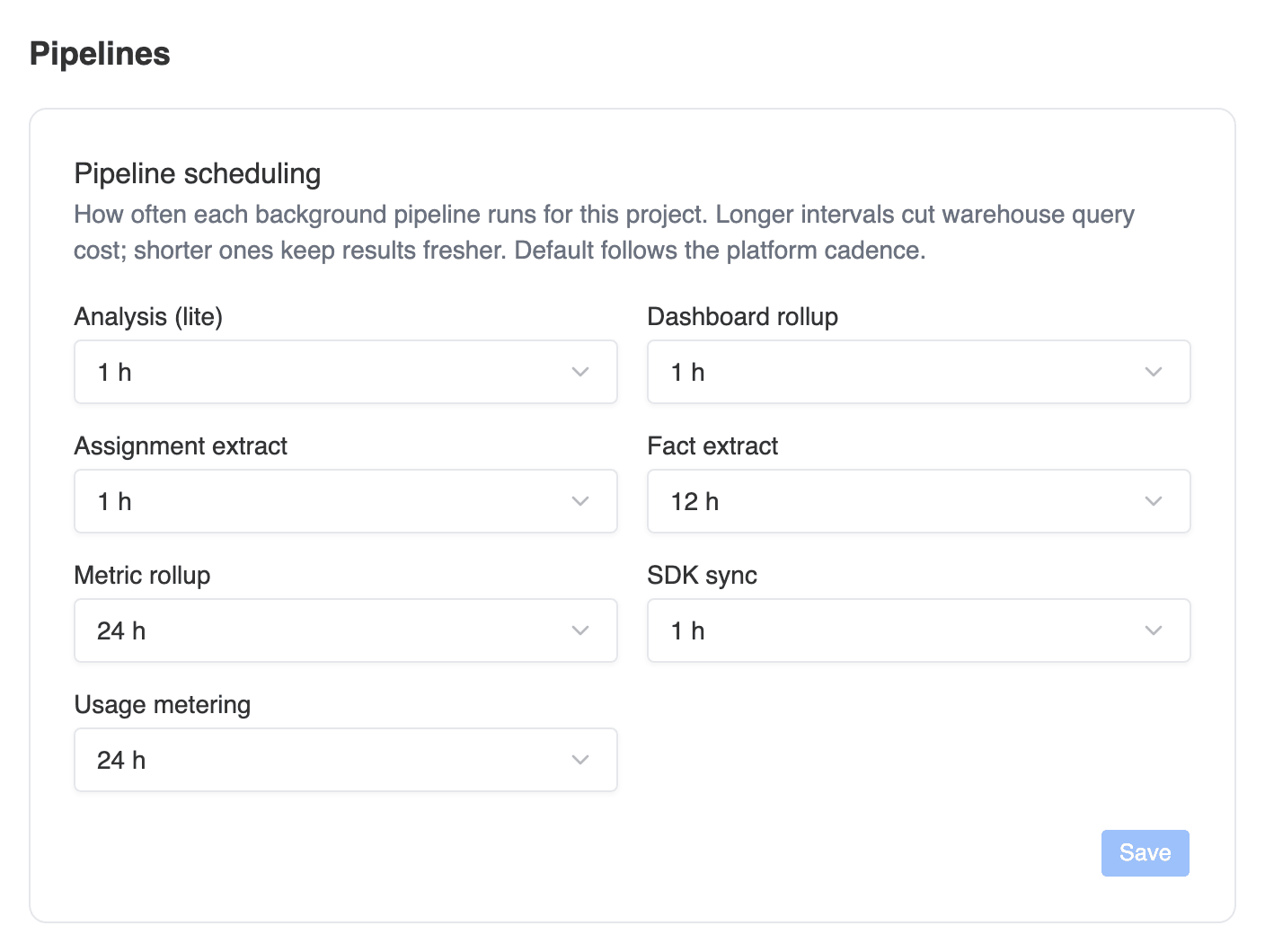
Pipeline scheduling card
One consistency rule is enforced: the assignment extract can’t run less often than dashboard rollup or analysis when those also have explicit intervals — the extract feeds both, and a coarser extract would starve them of fresh data. The card flags the conflict and blocks the save until you resolve it.
Usage metering feeds usage and billing; a longer interval only means the usage numbers refresh less often.
SDK configuration
The SDK tab shows the state of the SDK-facing config bundle per environment — its current version and how many parameters, layers, and policies it carries — with actions to view the bundle JSON and force a rebuild. Below it, SDK Event Sync controls whether SDK-emitted events (exposure, decision, and track events) are written into your connected warehouse on a schedule, with sync status, last-run stats, and a manual trigger. Projects on the Traffical-managed warehouse ingest SDK events automatically, so the sync section only appears when you bring your own warehouse. The sync cadence itself lives in pipeline scheduling above. Server-side context logging decides what the server-side resolution endpoint records for context keys that are not registered as attributes and that no matched policy lists. Names only (the default) writes the key with no value, enough for the key to appear under Seen in traffic, not registered. Keys and values also writes the values, which lets discovery infer types and show common values; use it while onboarding and switch back once you have registered what you need, because raw context then reaches your warehouse. Attributes set tologging: never are excluded either way, and SDKs evaluating a bundle locally are unaffected.
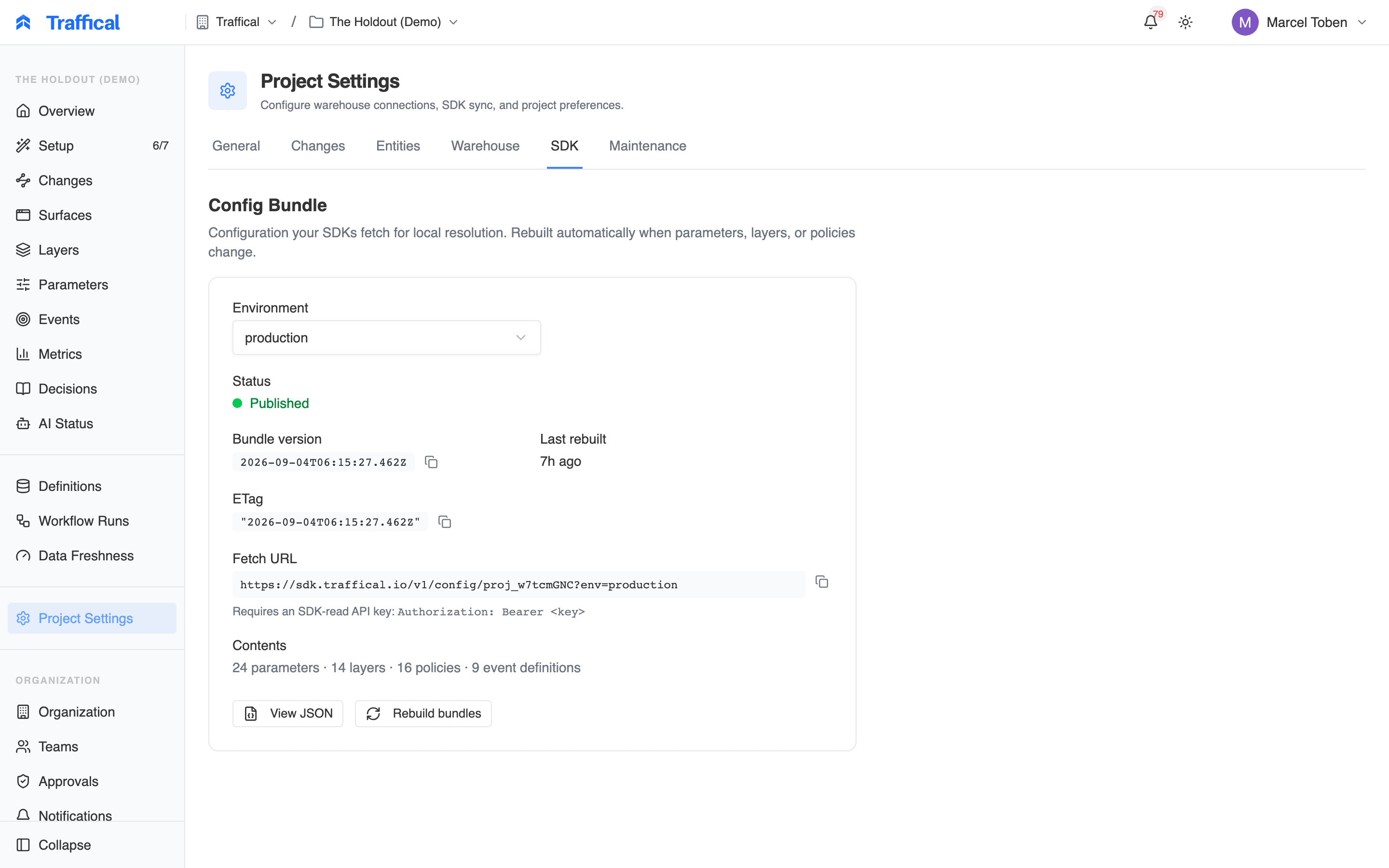
SDK configuration tab
Warehouse
The Warehouse tab configures the warehouse Traffical reads from for warehouse-native metrics. Choose Traffical Native (the managed warehouse) or bring your own — PostgreSQL, BigQuery, Snowflake, Databricks, or ClickHouse — and enter credentials. On a saved connection you can Test Connection, replace credentials, or delete the connection; credentials are stored securely and hidden after saving. See Connectors for what each warehouse needs.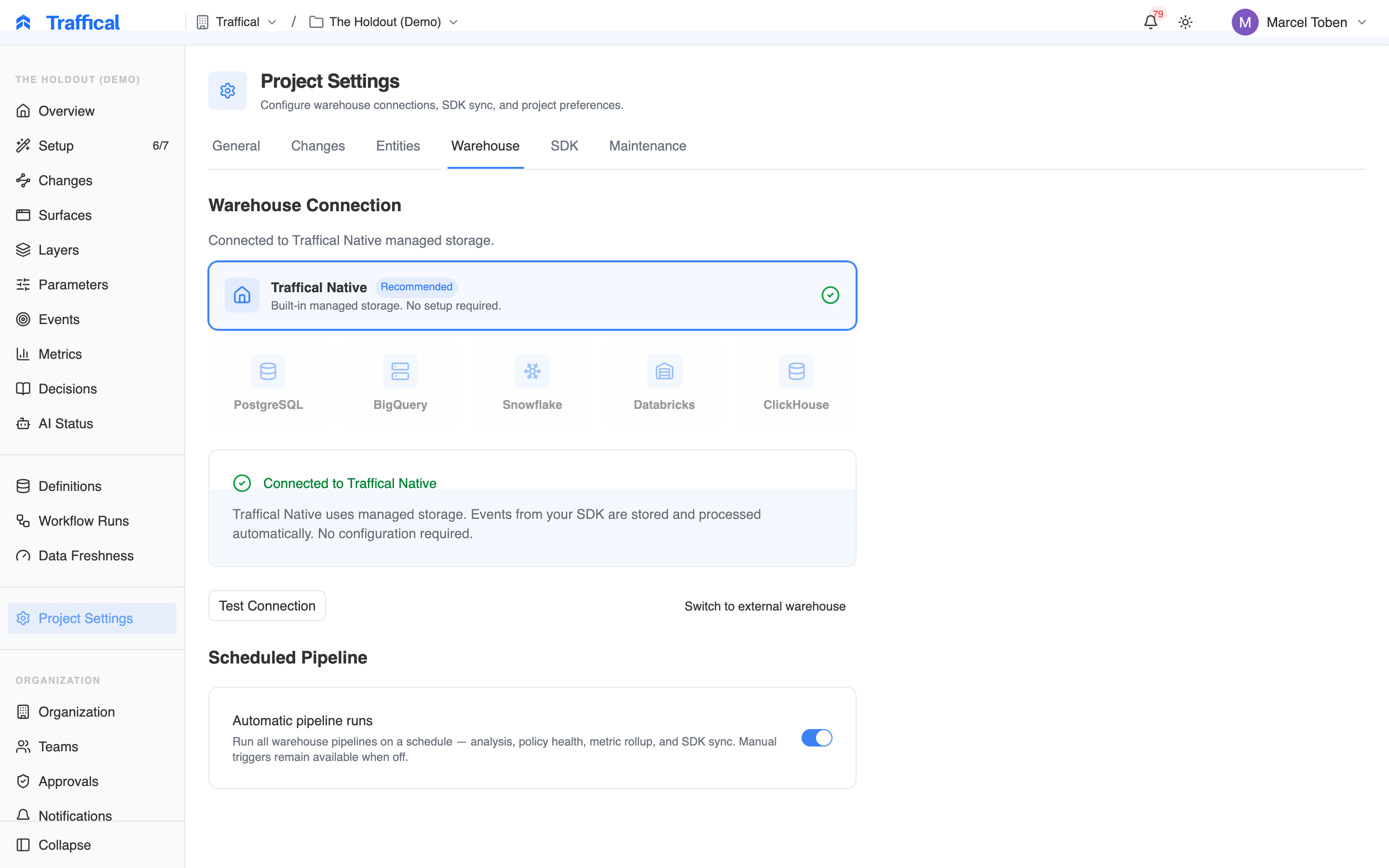
Warehouse connection editor
Entities
The Entities tab lists the project’s randomization units. Each entity declares the context field the SDK reads to identify a unit (e.g.userId, merchantId) and its key type — string, integer, or UUID. One entity is the project primary: layers that don’t name an entity explicitly inherit it. You can create entities here and promote one to primary; Traffical rebuilds the config bundle when the primary changes, so SDKs pick up the new layout on their next fetch.
Maintenance
The Maintenance tab runs project-level operations — data backfills, integrity audits, and diagnostics. Pick an action, review its labels (read-only or read-write, idempotent or destructive — non-idempotent actions get an extra warning), and execute; the result and full output appear inline. If something looks wrong with your data, start with the read-only audits — see Troubleshooting.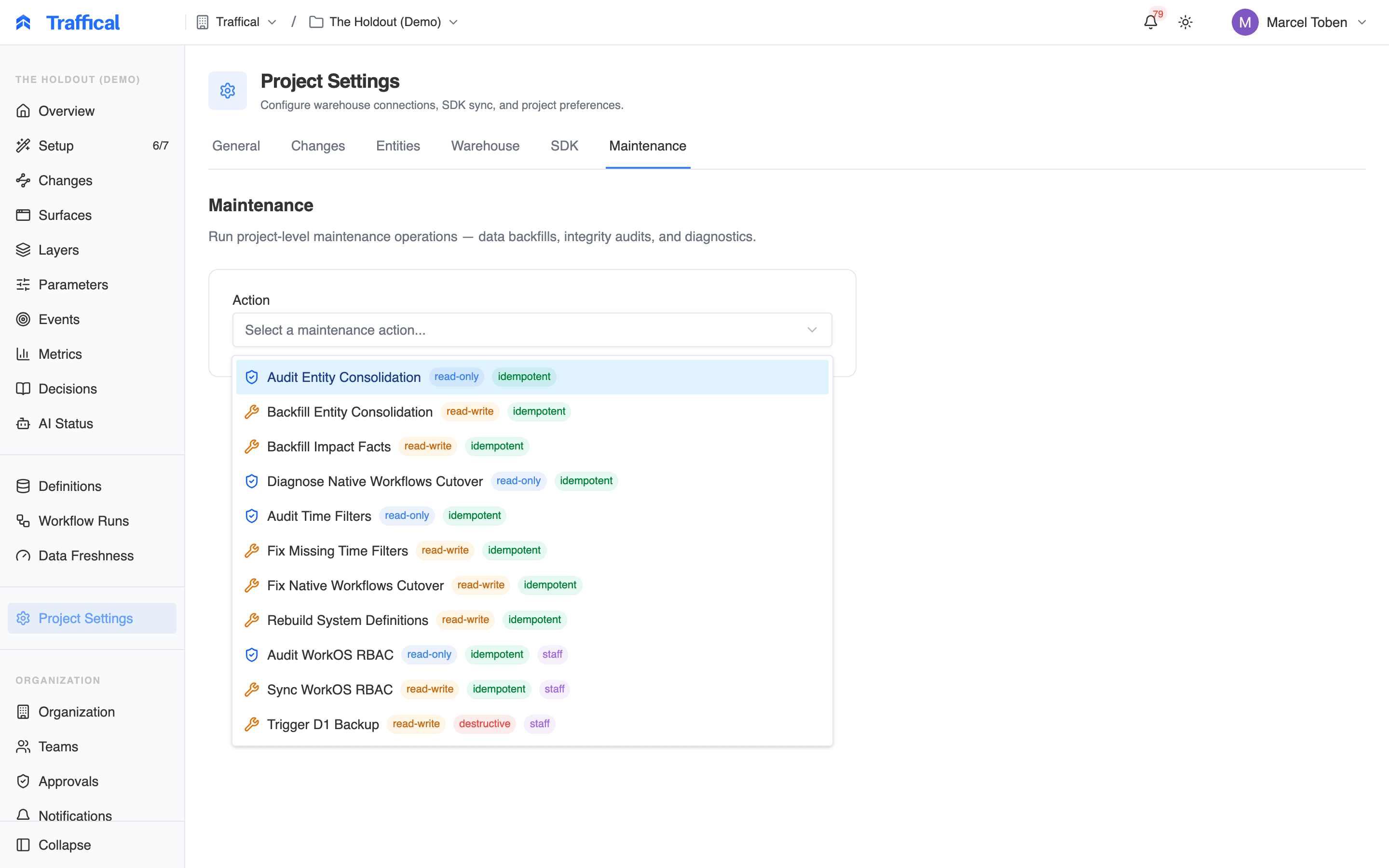
Maintenance actions
Archiving and deleting
At the bottom of the General tab, the danger zone holds Archive Project. Archiving hides the project from the project list and stops all background jobs — optimization, metric refreshes, syncs, rollups. It’s blocked while any policy is running: complete or pause running policies first, so archiving never silently kills a live policy. Archiving is reversible: restore the project any time from the organization page under the Archived filter. Permanent deletion is a separate, second step — only archived projects can be deleted, from that same organization page, and it requires typing the project’s name to confirm. Deletion removes all configuration — environments, parameters, policies, metrics, definitions, and decision log history — and can’t be undone. Already-ingested event data and any tables synced into your warehouse are not removed.Next steps
Changes
The wizard your change defaults feed into.
Pipeline
Runs, freshness, and what each pipeline stage produces.
Measurement progress
How the target MDE drives runtime estimation.
Usage and billing
What usage metering measures.